
ppd (A xxd clone in Python)
Contents
Disclaimer & Intro
This post has been made as my notes, even though I attempt to explain what I have setup/built and how, I do not owe anyone any explanation. Do NOT expect anything.
My blog is my garden.
So I did another mini-project recently, and finally decided to make some notes (write about it) now. It is a clone/replacement of the famous xxd program found on *nix systems. DO NOTE it is not 100% complete yet and there will be missing features. I do this just for fun, practice and learning. Because, what is computing if not fun?
if you want to learn more about xxd, please visit here or here
ppd vs xxd
| Feature | Status | Notes |
|---|---|---|
| Hexadecimal Dump | ✅ Done | Supports grouped hex dumps with configurable width and groups. |
| Binary Dump (Bits Mode) | ✅ Done | Implements binary (bits) output mode. |
| Autoskip Null Lines | ✅ Done | Skips redundant null lines and replaces them with *. |
| Revert Hex Dump to Binary | ✅ Done | Converts hex dumps back to their original binary format. |
| Plain Hex Dump Format | ✅ Done | Outputs a simplified, plain hexdump. |
| C Include File Output | ✅ Done | Generates C-style include arrays from binary data. |
| ASCII to EBCDIC Conversion | ✅ Done | Converts ASCII to EBCDIC encoding. |
| Customizable Column Width | ✅ Done | Configurable with the -c option. |
| Customizable Group Size | ✅ Done | Configurable with the -g option. |
| Seek to Offset | ✅ Done | Starts processing at a specified file offset. |
| Limit Bytes to Process | ✅ Done | Limits the number of bytes read using -l. |
| Uppercase Hex | ✅ Done | Outputs uppercase hex letters with -u. |
| Multithreading for Large Files | ✅ Done | Processes file chunks using a thread pool. |
| Read from Standard Input | ✅ Done | Supports reading from stdin if no file is specified. |
| Output to File | ❌ Not Done | No explicit support for redirecting output to a specified file. |
| Handle Special Shit on BSD/Linux/Unix-like Systems | ❌ Not Done | No handling for platform-specific quirks or differences yet. |
| Version Display | ✅ Done | Displays version information with -v. |
Legend
- ✅ Done: Feature is implemented and somewhat-functional (I think).
- ❌ Not Done: Feature is planned or missing.
Imports
In this program, I rely heavily on several Python modules to manage various aspects of file processing, threading, and command-line argument parsing. os and sys help handle system-level operations, such as file paths and error management. argparse is used to parse command-line arguments. For handling file I/O and manipulating paths, I use pathlib and codecs. The real fun comes from the concurrent.futures.ThreadPoolExecutor, which allows me to parallelize file chunk processing, speeding up large file reads. Additionally, I leverage itertools.islice for efficient chunking and slicing of file data.
import os
import sys
import argparse
from concurrent.futures import ThreadPoolExecutor
from pathlib import Path
from itertools import islice
import codecs
hex dump from raw bytes
The format_line function generates a formatted hex dump line from raw byte data. It takes in parameters such as the offset (the starting position in hexadecimal), data (the byte sequence to format), width (number of bytes per line), groupsize (size of each byte group), and uppercase (a flag to control whether hex values are printed in uppercase). The function splits the data into groups, converts each byte to its hex representation, and adds padding to align the output. It also converts the byte data into an ASCII string, replacing non-printable characters with periods. Finally, it returns a formatted string with the offset, hex values, and ASCII representation.
def format_line(offset, data, width=16, groupsize=2, uppercase=False):
    if not data:
        return ""
# Format hex values with proper grouping
    hex_values = []
    for i in range(0, len(data), groupsize):
        group = data[i:i + groupsize]
        group_hex = ' '.join(f'{b:02X}' if uppercase else f'{b:02x}' for b in group)
        hex_values.append(group_hex)

    grouped_hex = ' '.join(hex_values)
    padding = ' ' * (width * 3 - len(grouped_hex))
    ascii_repr = ''.join(chr(byte) if 32 <= byte <= 126 else '.' for byte in data)

    return f"{offset:08x}: {grouped_hex}{padding} {ascii_repr}"
Seek or read only chunks
The read_file_chunk function reads a specified portion of a file, starting from a given offset and reading size bytes. It opens the file in binary mode ('rb'), seeks to the specified offset, and then reads the required number of bytes. If an error occurs during the file operation, such as an IOError or OSError, it prints an error message to standard error and exits the program with a non-zero status. This function is useful to us for efficiently reading parts of large files without loading the entire file into memory.
def read_file_chunk(file_path, offset, size):
    try:
        with open(file_path, 'rb') as f:
            f.seek(offset)
            return f.read(size)
    except (IOError, OSError) as e:
        print(f"Error reading file: {e}", file=sys.stderr)
        sys.exit(1)
process_chunk func
The process_chunk function processes a specific chunk of a file by first reading a portion of the file using the read_file_chunk function, starting at the given offset and reading size bytes. It then formats the chunk into readable hex dump lines using the format_line function. The chunk is divided into smaller segments of the specified width, and each segment is formatted with the provided groupsize and uppercase options. The function returns a list of formatted lines.
def process_chunk(file_path, offset, size, width, groupsize, uppercase):
    chunk = read_file_chunk(file_path, offset, size)
    return [format_line(offset + i, chunk[i:i + width], width, groupsize, uppercase)
            for i in range(0, len(chunk), width)]
autoskip func (-a in xxd)
The autoskip function processes a list of lines, checking for consecutive null (empty) lines in the hex dump. It iterates through each line, and if the line is non-empty, it examines the hex part of the line to determine if it consists entirely of zero bytes (00). If a line is found to be a null line and it hasn't appeared consecutively before, it adds a * to the result, indicating a sequence of null data. Otherwise, it adds the original line to the result. The function helps in reducing clutter by replacing repetitive null lines with a single * to indicate the presence of null data, making the output more compact and easier to read.
def autoskip(lines):
    result = []
    prev_null = False
for line in lines:
        if not line:
            continue

        hex_part = line.split(":")[1].strip().split("  ")[0]
        is_null_line = all(byte == "00" for byte in hex_part.split())

        if is_null_line:
            if not prev_null:
                result.append('*')
                prev_null = True
else:
            result.append(line)
            prev_null = False
return result
bits_mode func (-b in xxd)
The bits_mode function processes a file in binary mode, reading a specified chunk of data from the given offset and size. It splits the chunk into smaller segments of 6 bytes and converts each byte into its 8-bit binary representation. For each 6-byte segment, it also creates an ASCII representation, replacing non-printable characters with a period (.). The function then formats the binary data and ASCII representation into a structured output, adding padding to align the binary columns. The result is a list of lines showing the binary data and its ASCII equivalent, similar to a hex dump but in binary format.
def bits_mode(file_path, offset, size):
    chunk = read_file_chunk(file_path, offset, size)
    lines = []
    for i in range(0, len(chunk), 6):
        data = chunk[i:i + 6]
        binary_data = ' '.join(f'{byte:08b}' for byte in data)
        ascii_repr = ''.join(chr(byte) if 32 <= byte <= 126 else '.' for byte in data)
        padding = ' ' * (48 - len(binary_data))
        lines.append(f"{offset + i:08x}: {binary_data}{padding} {ascii_repr}")
    return lines
revert_mode func (-r in xxd)
The revert_mode function converts a hex dump back into its binary form by processing a list of input lines. It includes a helper function, clean_hex, which extracts and cleans the hexadecimal data from each line, removing unnecessary characters. The main function iterates through the input lines, skipping empty lines and those starting with an asterisk (*). For each valid line, it converts the cleaned hexadecimal data back into binary using bytes.fromhex and writes the resulting binary data to standard output. This function is useful for reversing a hex dump into its original binary content.
def revert_mode(input_lines):
    def clean_hex(line):
        try:
            hex_part = line.split(':', 1)[1]
            if '  ' in hex_part:
                hex_part = hex_part.split('  ')[0]
            return ''.join(hex_part.strip().split())
        except (IndexError, ValueError):
            return None
for line in input_lines:
        line = line.strip()
        if not line or line.startswith('*'):
            continue

        hex_data = clean_hex(line)
        if hex_data:
            try:
                binary_data = bytes.fromhex(hex_data)
                sys.stdout.buffer.write(binary_data)
            except ValueError:
continuetocinclude func (-i in xxd)
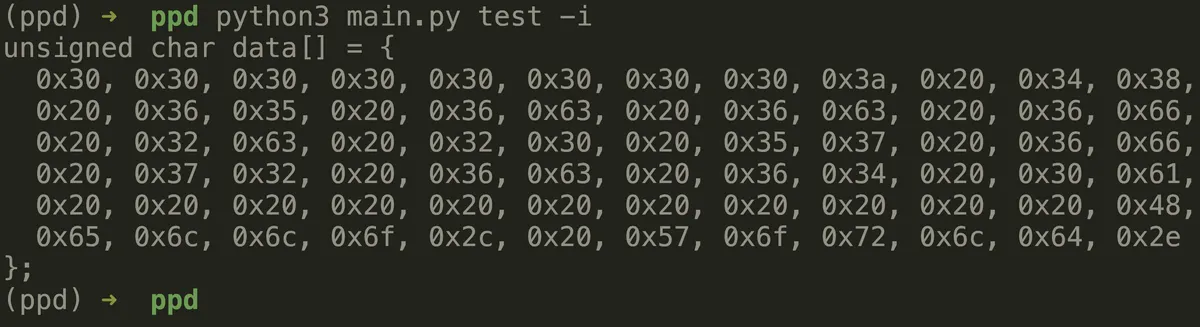
The to_c_include function converts a byte sequence into a C-style array declaration. If the data is empty, it returns a simple declaration for an empty array. For non-empty data, the function first converts each byte into its hexadecimal representation, prefixed with 0x. It then splits the hex bytes into chunks of 12 for better readability and formatting. These chunks are joined with commas and newlines to create the body of the C array declaration. The result is a string that represents the byte data as a properly formatted C unsigned char array, which can be directly used in C programs.
def to_c_include(data):
    if not data:
        return "unsigned char data[] = {};"

    hex_bytes = [f"0x{byte:02x}" for byte in data]
    chunks = [hex_bytes[i:i + 12] for i in range(0, len(hex_bytes), 12)]
    body = ',\n  '.join(', '.join(chunk) for chunk in chunks)
    return f"unsigned char data[] = {{\n  {body}\n}};"
to_ebcdic func (-E in xxd)
The to_ebcdic function converts data to the EBCDIC encoding (specifically the cp500 variant). If the input data is in bytes, it first attempts to decode it from ASCII and then encodes it into EBCDIC. If decoding from ASCII fails (due to a UnicodeError), it simply returns the original byte data. If the input data is not in bytes (i.e., it’s a string), the function directly attempts to encode it to EBCDIC. If the encoding process fails, it returns the original data unmodified. This function is useful for converting data between ASCII and EBCDIC formats, typically used in legacy systems.
def to_ebcdic(data):
    if isinstance(data, bytes):
        try:
            return codecs.encode(data.decode('ascii'), 'cp500')
        except UnicodeError:
            return data
    try:
        return codecs.encode(data, 'cp500')
    except UnicodeError:
return dataplainformatline func
The plain_format_line function generates a simple hex dump line in plain format. It takes an offset (the starting position of the data in hexadecimal), data (the byte sequence to format), and an optional width parameter (defaulting to 16, which controls the number of bytes per line). The function converts each byte in the data to its two-digit hexadecimal representation, and then formats the output by displaying the offset and the hexadecimal bytes. If no data is provided, it returns an empty string. This function is useful for creating straightforward hex dumps without additional formatting.
def plain_format_line(offset, data, width=16):
    if not data:
        return ""
    hex_bytes = ' '.join(f'{byte:02x}' for byte in data)
    return f"{offset:08x}: {hex_bytes}"
The MAIN func
The main function is the entry point for a command-line tool that provides various options for processing and displaying file data, similar to the xxd command. It uses the argparse library to define command-line arguments, including options for toggling binary or hex output, adjusting output format (e.g., plain hexdump or C include), handling EBCDIC encoding, and more. The function reads the specified file, processes it in chunks, and applies the requested transformations (such as converting to binary or EBCDIC, or reverting a hex dump back to binary). It also supports multi-threading for faster processing and handles different file sizes, offsets, and output formats. If errors occur during processing, they are captured and reported. Finally, the function prints the processed output, either to the terminal or to a specified output file.
def main():
    parser = argparse.ArgumentParser(description="A multi-threaded xxd replacement...Kinda")
    parser.add_argument('file', type=str, nargs='?', help="Input file to process.")
    parser.add_argument('outfile', type=str, nargs='?', help="Output file (optional).")
    parser.add_argument('-a', '--autoskip', action='store_true', help="Toggle autoskip for null lines.")
    parser.add_argument('-b', '--bits', action='store_true', help="Dump in binary (bits) instead of hexadecimal.")
    parser.add_argument('-c', '--cols', type=int, default=16, help="Number of columns per line (default: 16).")
    parser.add_argument('-E', '--ebcdic', action='store_true', help="Change ASCII to EBCDIC encoding in the output.")
    parser.add_argument('-g', '--groupsize', type=int, default=2, help="Group output by specified byte size (default: 2).")
    parser.add_argument('-i', '--include', action='store_true', help="Output as a C include file.")
    parser.add_argument('-l', '--len', type=int, help="Limit the number of bytes to process.")
    parser.add_argument('-p', '--plain', action='store_true', help="Output in plain hexdump style.")
    parser.add_argument('-r', '--revert', action='store_true', help="Revert hex dump back to binary.")
    parser.add_argument('-s', '--seek', type=str, help="Start at a specified file offset.")
    parser.add_argument('-u', '--uppercase', action='store_true', help="Use uppercase hex letters.")
    parser.add_argument('-v', '--version', action='store_true', help="Show version information and exit.")

    args = parser.parse_args()

    if args.version:
        print("ppd version 1.0")
        sys.exit(0)

    if not args.file and not sys.stdin.isatty():
        args.file = sys.stdin.buffer
    elif not args.file:
        parser.print_help()
        sys.exit(1)

    try:
        file_path = Path(args.file) if isinstance(args.file, str) else args.file
        if isinstance(file_path, Path) and not file_path.is_file():
            print(f"Error: {file_path} is not a valid file.", file=sys.stderr)
            sys.exit(1)

        file_size = file_path.stat().st_size if isinstance(file_path, Path) else 0
        chunk_size = min(65536, file_size if file_size > 0 else 65536)
        width = max(1, args.cols)
        groupsize = max(1, args.groupsize)

        if args.revert:
                if not args.file:
                    print("Error: Input file required", file=sys.stderr)
                    sys.exit(1)
                with open(args.file, 'r') as infile:
                    revert_mode(infile)
                return

        start_offset = 0
if args.seek:
            try:
                start_offset = int(args.seek, 0)
                if start_offset < 0:
                    start_offset = max(0, file_size + start_offset)
            except ValueError:
                print(f"Error: Invalid seek value: {args.seek}", file=sys.stderr)
                sys.exit(1)

        end_offset = file_size if not args.len else min(start_offset + args.len, file_size)

        with ThreadPoolExecutor() as executor:
            futures = []
            for offset in range(start_offset, end_offset, chunk_size):
                size = min(chunk_size, end_offset - offset)
                if args.bits:
                    futures.append(executor.submit(bits_mode, file_path, offset, size))
                else:
                    futures.append(executor.submit(process_chunk, file_path, offset, size,
                                                width, groupsize, args.uppercase))

            all_lines = []
            for future in futures:
                try:
                    lines = future.result()
                    all_lines.extend(lines)
                except Exception as e:
                    print(f"Error processing chunk: {e}", file=sys.stderr)
                    sys.exit(1)

        if args.autoskip:
            all_lines = autoskip(all_lines)

        if args.plain:
            all_lines = [plain_format_line(i * width, line.encode() if isinstance(line, str) else line, width)
                        for i, line in enumerate(all_lines)]

        if args.ebcdic:
            all_lines = [to_ebcdic(line) if isinstance(line, str) else to_ebcdic(str(line))
                        for line in all_lines if line]

        if args.include:
            print(to_c_include(b''.join(line.encode() if isinstance(line, str) else line
                                      for line in all_lines)))
        else:
            for line in all_lines:
                if line:
                    print(line)

    except KeyboardInterrupt:
        print("\nOperation cancelled by user", file=sys.stderr)
        sys.exit(1)
    except Exception as e:
        print(f"Error: {e}", file=sys.stderr)
        sys.exit(1)
call main actually
if __name__ == '__main__':
    main()
Screenshots of some flags
Create a text file

Autoskip

Bits

Cols

EBCDIC

C-style output
Len

Version (this is stupid)

## Conclusion
I am aware that there are some issues, They will get resolved when I get time. Hope you liked this nice sunday evening code. You are free to use it in your org/home as long as you follow the license.


#Linux #OpenBSD #development #hacking #python #research
🔑 Verify authenticity
PGP key xer0x-public.asc · id e8270d03
sha256(post) f53c0024719e416ed9a0e72d367c45f5fea09763c15a867977b18133e5c206d5
Confirm this post is byte-for-byte authentic — paste into any macOS or Linux terminal:
curl -fsSL https://xer0x.in/blog/ppd/content.txt | openssl dgst -sha256 | grep -qi f53c0024719e416ed9a0e72d367c45f5fea09763c15a867977b18133e5c206d5 && echo "signature ok" || echo "TAMPERED"